
Tracking
RodentFlow uses a classic computer-vision tracker. It learns what the empty arena looks like, finds the region of each frame that differs from it, picks the region most likely to be the animal, and takes the center of that region as the animal's position. There is no neural network and no training step. Each step can be stated in one sentence, and this page does exactly that.
Why a classic tracker?
For a single animal filmed from above against a contrasting floor, background subtraction locates the body center as accurately as needed for zone times, entries, distance and freezing. On the validation videos the median position error was 0.15–0.5 cm (Validation). It also has properties that matter on a phone and in a lab:
- No training and no labeled frames. It works on the first video of a new setup.
- Deterministic. The same video and settings always give the same numbers.
- Fast and light. It runs on the iPhone CPU at a resolution of 192 pixels, with no upload.
- Explainable failures. When it fails, the cause is visible in the preview, such as a shadow, a reflection, or poor contrast.
What it does not give you is body parts: nose, tail base, paws. The limits are listed at the end of this page.
Source code
Everything on this page is implemented in NativeMouseTracker.swift, and the whole-video reading in FullVideoAnalyzer.swift.
1. Reading the video at 10 Hz
The video is decoded from start to finish. For every 0.1 s step, the first frame at or after that time is used, and its original timestamp is kept. Video frame rate and dropped frames therefore do not distort time.
Each frame is converted to gray levels and scaled so that its long side is 192 pixels. Video luma (16–235) is expanded to the full 0–255 range, so frames and background share the same scale. A 1080p frame becomes 192 × 108 pixels. That is plenty for a mouse body and keeps processing fast.
2. The background: a median over time
To learn the empty arena without asking you to film it empty, the app takes 21 frames spread evenly over the video and computes, for every pixel, the median of its 21 gray levels.
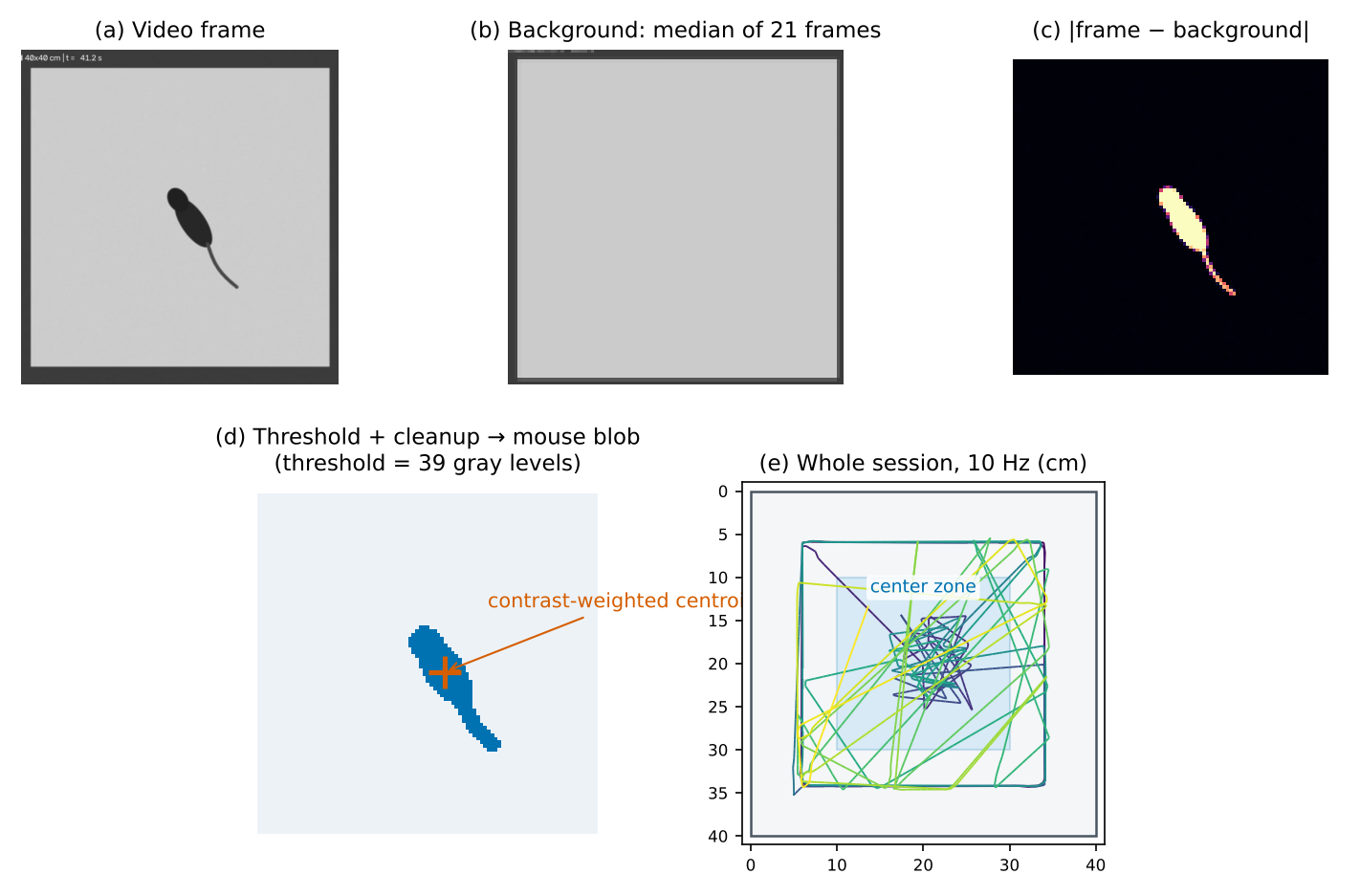
At any given pixel, the animal is present in only a few of the 21 frames. The median ignores those minority values and returns the floor. The animal "disappears" from the background, as panel (b) of the figure shows.
Resting-animal repair
The median fails where the animal stayed in the same place in more than half of the sampled frames: sitting in a closed arm, freezing in a corner, or waiting on the platform. The resting animal becomes part of the background. Later, when the animal has moved away, the empty floor at that spot differs from the background and looks like a second animal, a stationary "ghost" that the tracker might follow.
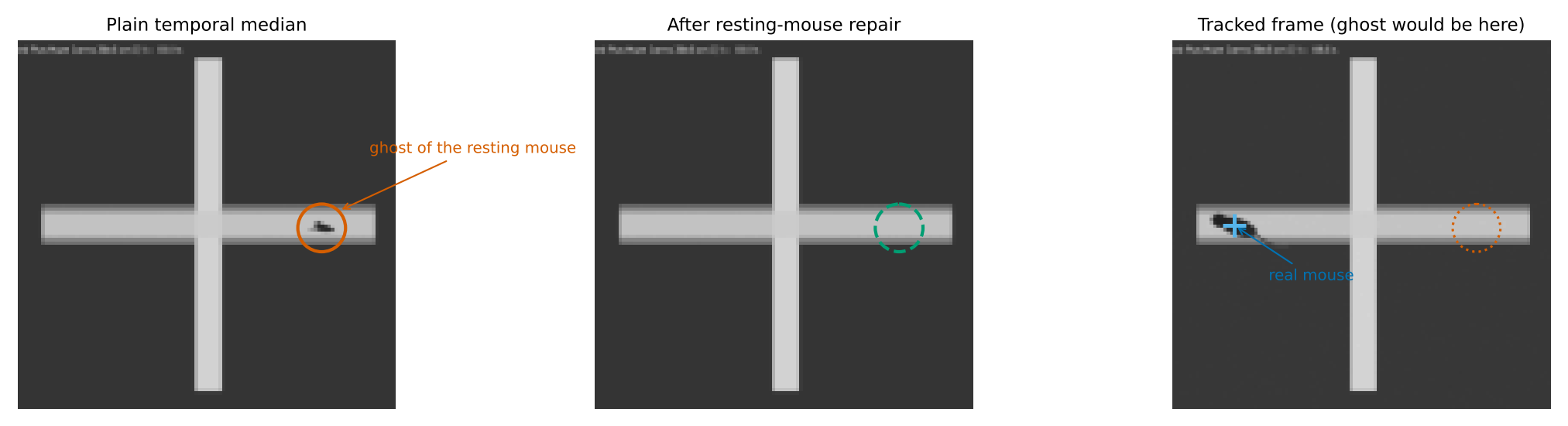
The tracker recognizes a ghost by a pattern that a real animal does not produce. Within the 21 background frames:
- A foreground region appears at the same place in at least two frames.
- Each time, it comes with a second region of opposite polarity elsewhere. The ghost is brighter than the background where the real animal is darker, or the reverse.
- In those frames the region's background value stands out from the surrounding floor, while the frame itself matches the floor.
Where all three hold, the background there is rebuilt from the frames in which the spot was empty. Ordinary videos do not show this pattern, and their background is left unchanged. Among the ten validation videos, the repair occurred only in the plus-maze video, covering 5.2 % of the arena.
An animal that never moves cannot be separated from the background by this or any other background method.
3. Difference and adaptive threshold
For each frame, the app computes the absolute difference between the frame and the background, only inside the calibrated arena (panel c). Using the absolute value means both dark animals on light floors and light animals on dark floors are found.
A pixel counts as foreground if its difference exceeds a threshold that adapts to every frame:
threshold = mean + 1.75 × SD of the differences inside the arena, kept between 14 and 48 gray levels.
The animal covers only about 1 % of the arena, so the mean and SD mostly describe the noise of the floor: compression, sensor noise, slight light changes. The threshold therefore sits just above the noise in each video and lighting. The limits keep it sensible in very clean or very noisy frames.
4. Cleanup
Two light 3 × 3 majority filters smooth the binary mask. In the first pass, a pixel becomes foreground if at least 3 of the 9 pixels in its neighborhood are foreground; in the second, at least 2. This removes isolated noise pixels and closes small holes without eroding the body.
5. Choosing the animal among candidates
Connected foreground regions (8-connected) are collected. Regions smaller than 0.07 % or larger than 14 % of the arena are discarded. Each remaining candidate is scored by five properties:
| Weight | Property | Favors |
|---|---|---|
| 0.28 | Motion continuity | Candidates close to the previous position (decays over 16 % of the frame diagonal) |
| 0.27 | Size | An area near 1.2 % of the arena (log-normal shape, broad) |
| 0.20 | Contrast | A large mean difference from the background |
| 0.17 | Size continuity | An area similar to the previous frame's |
| 0.08 | Fill | A compact shape that fills its bounding box |
The candidate with the highest score is the animal. If no candidate is left, for example because the animal is hidden in a covered box or is out of view, the sample is marked not detected. Its position is held at the last known point for drawing only. Not-detected samples are left out of zone times and distance (see Metrics).
6. The tracking point: contrast-weighted centroid
The position is the centroid of the chosen region, with each pixel weighted by its difference from the background. Pixels that are only partly covered by the animal, at the body edge or along the thin tail, count less than pixels fully covered by the body.
This matters because the tail flickers in and out of the binary mask at analysis resolution. An unweighted centroid was pulled about 1 cm backwards and jittered. Weighting reduced the median position error on the validation videos from about 1 cm to 0.15–0.5 cm.
7. Light smoothing
The final point is 90 % of the new centroid plus 10 % of the previous point. This removes single-pixel jitter, and at 10 Hz the lag it adds is about 0.01 s, which is negligible.
8. From pixels to centimeters
The calibration turns image pixels into arena centimeters:
- Rectangle. A 4-point homography maps the four corner handles onto a rectangle of the entered width and height. It corrects perspective, so a camera that is not exactly overhead still gives correct distances on the floor plane.
- Circle. The center and radius handles scale the circle to the entered diameter. This assumes an overhead camera.
- Mazes (plus, Y, T). Each arm is defined by its calibrated centerline. A position is assigned to the nearest arm and expressed as distance along that arm plus offset across it, so each arm gets its own pixel-to-cm scale. See maze geometry.
Markers placed during calibration, such as objects, the platform and the target hole, are converted with exactly the same mapping, so animal and markers share one coordinate system.
9. The motion index
Independently of finding the animal, every sample also records the fraction of arena pixels that changed by at least 20 gray levels since the previous sample 0.1 s earlier. This is the signal used for freezing (details). It does not depend on detection: a still animal that blends into the background still has a motion index near zero.
Preview, full analysis and checkpoints
The 10-second preview and the full analysis run the same code, so a good preview predicts a good full run. During the full analysis, the positions and the tracker's short memory (previous position and size) are written to a checkpoint about every 300 samples, i.e. 30 s of video. A resumed analysis continues without a jump.
Limits
- Body center only. Nose-based measures (object sniffing, hole pokes) are approximated with zones around the body center. Head direction, rearing and grooming are not measured.
- One animal. Two animals in one arena merge into one region or are confused with each other.
- Static camera and light. The background is learned once per video. A camera bumped mid-session, a light switched on, or bedding moved around changes the background and can create false candidates.
- Resolution. Very small arenas in the picture leave few pixels per centimeter, which inflates path length (see the plus-maze case in Validation).
For body parts, several animals or behavior classification, use a deep-learning pose estimator (Further reading). Their per-animal outputs can be imported into RodentFlow for statistics and figures.