
From positions to metrics
Tracking produces one sample every 0.1 s: a time, a position in arena centimeters, whether the animal was detected, the maze zone for mazes, and the motion index. Every video metric is computed from this list by the rules on this page. The rules are applied after tracking. Changing a zone or threshold on the result screen recomputes everything from the saved samples in a fraction of a second, without the video.
Source code
These rules are implemented in AssayEngine.swift; the defaults are in ZoneConfig in ResultModels.swift.
Time
Each sample stands for the time until the next sample, normally 0.1 s. If there is a gap in the video, such as a dropped stretch, a sample counts for at most five sampling intervals (0.5 s), so a gap cannot inflate the time in whatever zone the animal was last seen.
The analysis window restricts everything to part of the video. Start after is counted from the first sample and Length is the scored duration (0 = to the end). Latencies are measured from the start of the window.
Zones and time in a zone
A zone is a region in arena centimeters: the center square, an arm, a chamber, the area around an object, a quadrant. Time in a zone is the sum of the time of the detected samples whose position lies in that zone.
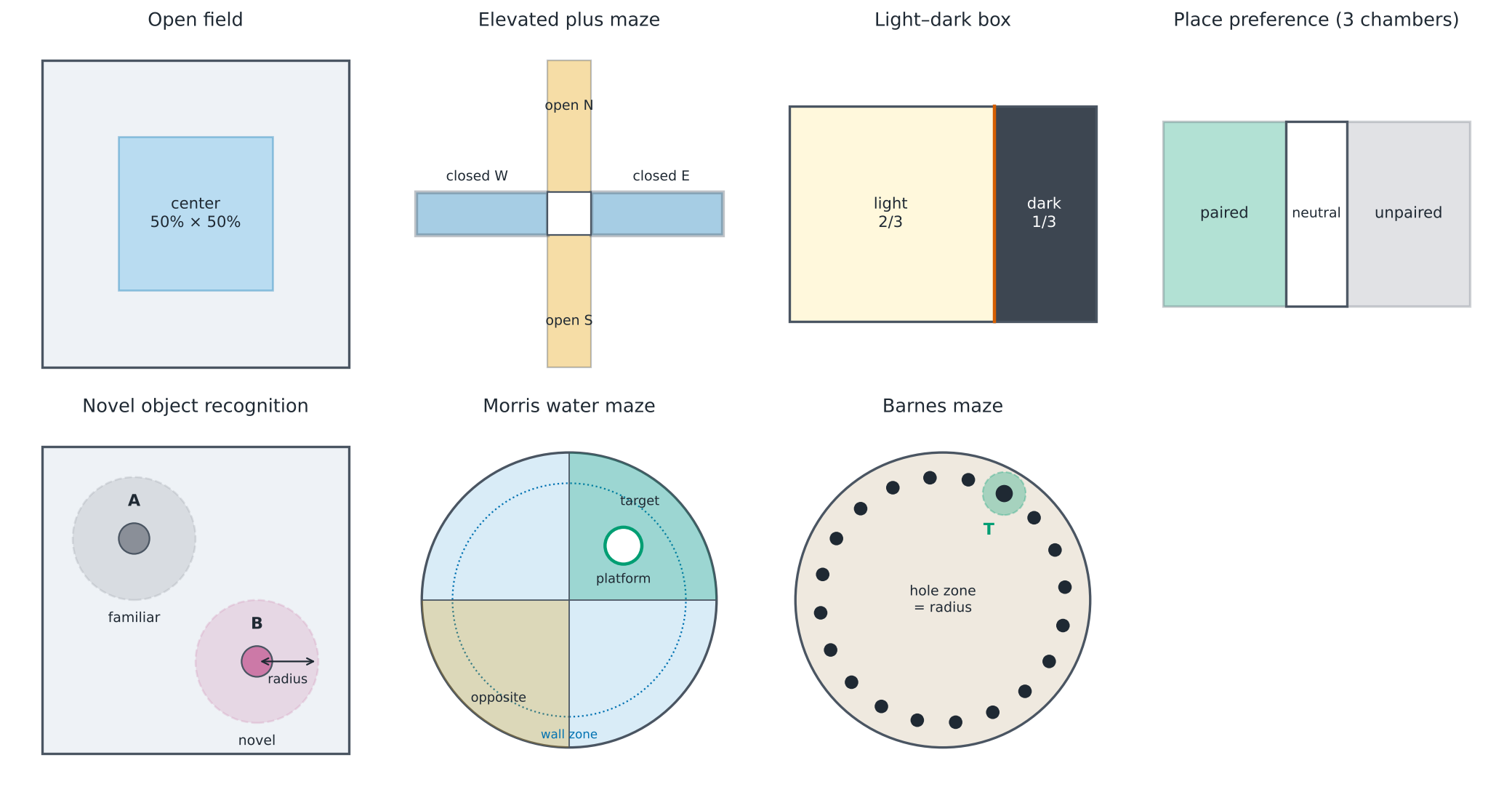
Percentages use detected time as the denominator. For example, center time % = center time / time the animal was detected × 100. A few undetected samples therefore do not bias the percentage towards the periphery. Assay-specific ratios are defined on the assay pages: open-arm % = open / (open + closed), light % = light / (light + dark), quadrant % = quadrant / detected swim time.
Entries and the entry criterion
The position jitters by a few millimeters, and an animal standing on a zone border would otherwise produce dozens of "entries". An entry is therefore counted only when the animal has stayed in the new zone for the entry criterion. The entry is then dated to the moment it crossed in.
| Assay | Entry criterion (default) |
|---|---|
| Open field, object recognition | 0.3 s |
| Plus maze, Y-maze, T-maze | 0.25 s |
| Light–dark box, place preference | 0.5 s |
| Barnes maze | 0.2 s |
Samples where the animal is not detected do not end a stay: the animal is assumed to remain in its last zone until it is seen elsewhere. The zone the animal is in at the start of the window is not counted as an entry. Latency to a zone is 0 if the animal starts there, and the window length if it never enters.
This is the same rule a human scorer applies when requiring "all four paws in the arm". It is expressed in time because the tracker sees the body center, not paws.
Distance and speed
Distance is the sum of straight steps between consecutive detected samples. A step into or out of an undetected stretch adds nothing, so the jump after a period of hiding is not counted as running.
Speed at a sample is the distance between its two neighbors divided by the time between them, 0.2 s at 10 Hz (central difference). It is defined only where all three samples are detected. Averaging over 0.2 s keeps millimeter jitter from looking like movement.
Mean speed = total distance / window duration. For the water maze, it is the swim path / swim time.
Mobility and immobility
A sample is mobile when its speed is at or above the moving threshold (open field: 2 cm/s). Mobile time % is mobile time / time with a known speed. Immobility adds up runs below the threshold that last at least the minimum bout (2 s). Shorter pauses are not counted.
Immobility in the open field is a slow-movement measure. Freezing in fear conditioning is stricter and uses the motion index (below), because a crouching animal can shift its body slightly without its center moving.
Maze geometry
Mazes are calibrated by their centerlines rather than by a rectangle. Each arm runs from the junction (J or C) to its end handle, with the entered length and width.
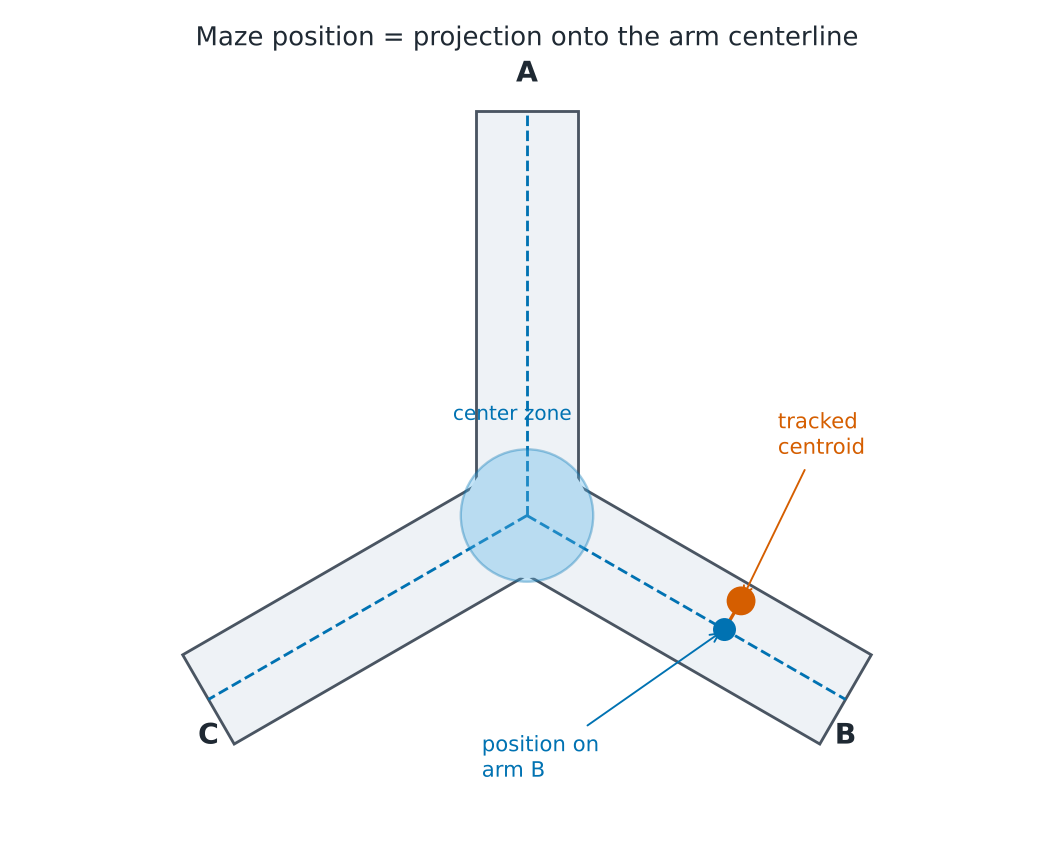
- Center zone. In the Y- and T-maze it covers positions within 1.1 arm widths of the junction, measured along the arm. In the plus maze it is the square where the arms cross (side = arm width), optionally enlarged by the Extra center margin.
- Search area. The tracker looks for the animal only inside the arm corridors, slightly wider than the entered arm width, so movement outside the maze, such as an experimenter's hand, is ignored.
- Arm entries use the entry criterion of the maze (0.25 s). A return to the same arm through the center counts as a new entry.
Circular arenas
Water maze.
- Quadrants are 90° sectors centered on the direction of the platform from the pool center (target), the opposite sector, and two adjacent ones.
- Escape is the first moment the animal is in the platform zone and stays there for the required time (1 s). Swim measures cover the time until escape.
- Mean distance to platform (Gallagher proximity) is the average distance from the platform center over the swim. Unlike latency, it reflects how close to the platform the animal searched during the whole swim.
- Crossings count every entry into the platform zone, with no minimum stay.
- Wall-zone time uses the band within the wall-zone width of the pool wall.
Barnes maze.
- The holes are placed evenly on the ring through the target hole.
- A position belongs to the nearest hole within the hole-zone radius, so neighboring zones never double count.
- Visits use the entry criterion (0.2 s). Errors are visits to non-target holes.
- Escape is detected when the animal is last seen within two zone radii of the target and stays unseen for at least 3 s, i.e. it entered the escape box.
Freezing
Freezing is measured from the motion index: for each sample, the fraction of arena pixels whose gray level changed by ≥ 20 levels (out of 255) since the previous sample 0.1 s earlier. The threshold of 20 lies above the 12–24 level flicker that video compression produces at the edges of a perfectly still animal, and well below the change caused by real movement of a contrasting animal.
To make the index independent of animal size and camera distance, it is divided by the animal's typical body area, the median size of the tracked body over the session:
motion (% of body) = changed pixels / median body area × 100
A sample is still when this is below the freezing threshold (5 %). A run of still samples is freezing when it lasts at least the minimum bout (1 s). Session, baseline, CS and inter-trial freezing are the fractions of freezing time within those periods, with times counted from the protocol start you set.
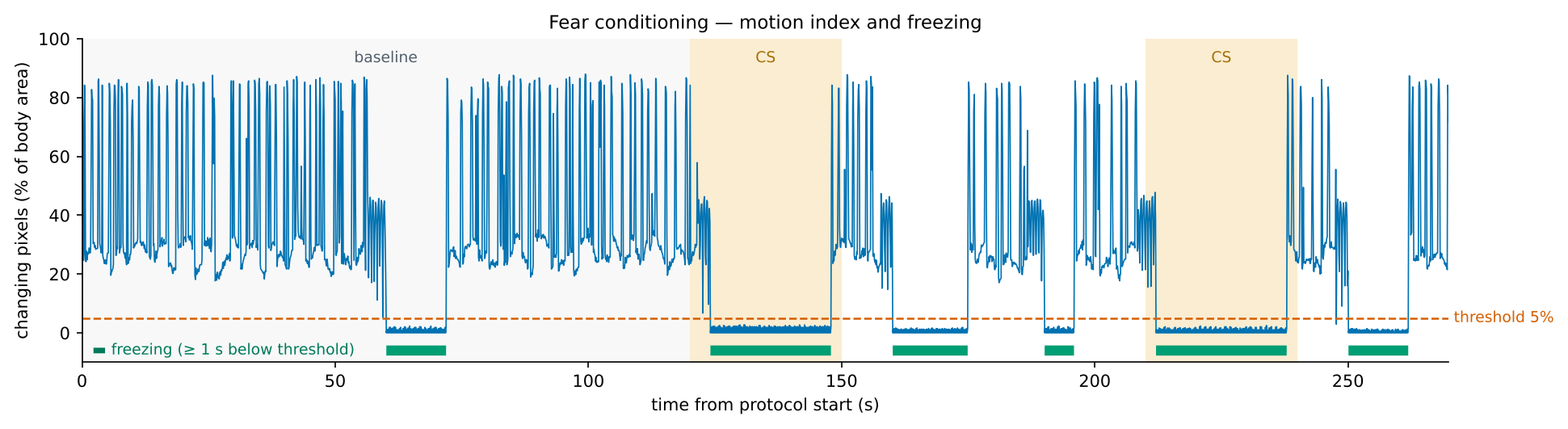
This follows the widely used principle of automated freezing scoring: pixel change between frames, a threshold, and a minimum duration. The threshold depends on the setup, so calibrate it once against hand scoring (see the fear conditioning page).
Quality control
Every video result carries Tracked samples %, and the app adds a flag when it is below 90 %, except in the light–dark box, fear conditioning and the Barnes maze, where hiding is expected. Assay-specific flags cover missing markers, too few arm entries, low exploration, an unreached platform or target, and negative intakes. Flags are listed at the top of the result and noted in the Groups statistics, but results are never excluded automatically.