
Learning & memory
All six assays on this page can be scored from video, entered by hand or imported.
Y-maze
Spontaneous alternation: the tendency to enter the arm visited least recently.
Arena. Y-maze: J on the junction, A, B, C on the arm ends. Defaults: arm length 35 cm, arm width 10 cm.
Settings: Arm entry criterion 0.25 s. The animal must stay in an arm that long before the entry counts.
| Metric | Unit | Definition |
|---|---|---|
| Spontaneous alternation | % | Triplets of three different arms / (entries − 2) × 100 |
| Arm entries | count | All arm entries |
| Alternations | count | Overlapping triplets with three different arms |
| Total distance | m | Sum of steps |
| Tracked samples | % |
Label: the arm sequence, e.g. ABCACBABCBA. In that example there are 11 entries and 6 of the 9 overlapping triplets contain all three arms, so alternation is 6/9 = 66.7 %.
How entries are found. Each position is mapped onto the nearest arm centerline. Within 1.1 arm widths of the junction it counts as center. A return to the same arm via the center is a new entry of that arm, as in hand scoring, and it breaks the alternation. Manual entry takes the sequence as typed.
T-maze
Spontaneous or rewarded choice between the left and right arm.
Arena. T-maze: J junction, S start-arm end, L and R choice-arm ends. Defaults: start arm 40 cm, choice arms 30 cm each, width 10 cm.
Settings: Arm entry criterion 0.25 s.
| Metric | Unit | Definition |
|---|---|---|
| Right first choice | % | 100 if the first choice-arm entry is right, 0 if left. Averaged over runs, this gives % right choices. |
| Left-arm entries, right-arm entries | count | Entries into each choice arm |
| Choice-arm entries | count | Left + right |
| Choice latency | s | Time to the first choice-arm entry |
| Total distance | m |
Labels: first choice; arm sequence (L/R). Use Trial for repeated runs.
Novel object recognition
Exploration of a novel object compared with a familiar one.
Arena. Rectangle or circle, plus markers A and B on the object centers.
Settings
| Setting | Default | Meaning |
|---|---|---|
| Novel object | B | Which marker is the novel object in the test. In training, B is reported as "novel" too, which checks for an object or side bias. |
| Interaction radius (centroid) | 8 cm | Distance from the object center within which the body center counts as exploring |
| Exclusion criterion (total) | 10 s | Animals exploring less in total are flagged |
| Zone entry criterion | 0.3 s | Minimum stay for an approach (bout) |
| Analysis window | first 300 s | Exploration is scored in the first 5 minutes by default |
| Metric | Unit | Definition |
|---|---|---|
| Discrimination index | — | (novel − familiar) / (novel + familiar), from −1 to 1. Chance is 0. |
| Recognition index | % | Novel / (novel + familiar) × 100. Chance is 50 %. |
| Novel, familiar object exploration | s | Time with the body center inside each interaction zone |
| Total exploration | s | Novel + familiar |
| Novel, familiar object bouts | count | Approaches meeting the entry criterion |
| Latency to first approach | s | Time to the first approach to either object |
| Total distance | m |
Why 8 cm?
Exploration is classically scored as the nose within about 2 cm of the object and pointed at it. RodentFlow tracks the body center, which sits about 4–5 cm behind the nose. While a mouse sniffs an object 4–6 cm across, its body center is therefore about 7–9 cm from the object center. Use roughly object radius + 5 cm. The body-center rule cannot tell sniffing from sitting next to the object, so check a few videos against hand scoring. For nose-based scoring, enter hand-scored times with Enter Values instead.
Within-animal comparison in Groups: Novel vs familiar exploration (paired). Between groups: DI, with an optional test against 0.
Morris water maze
Spatial learning (acquisition) and memory (probe) in a pool with a hidden platform.
Arena. Circle (C center, R edge) with the pool diameter, plus marker P on the platform center. Phase: Acquisition or Probe. Use Day and Trial for acquisition.
Settings
| Setting | Default | Meaning |
|---|---|---|
| Platform zone radius | 6 cm | Radius around the platform center |
| Trial maximum | 60 s | Length of the scored trial; latency when the platform is not found |
| Must stay on platform | 1 s | Escape requires staying in the platform zone this long |
| Wall zone width | 10 cm | Band along the wall used for thigmotaxis |
| Trial start in video | 0 s | Where the trial starts in the video |
| Metric | Unit | Definition |
|---|---|---|
| Escape latency | s | Time to reach the platform zone and stay for the required time. If the platform is not found, it is the trial maximum, with a flag. |
| Path length | m | Swim path until escape, or until trial end |
| Swim speed | cm/s | Path length / swim time |
| Platform found | % | 100 if reached, else 0. Averaged over trials, this gives % found. |
| Target quadrant time | % | Time in the 90° sector centered on the platform direction / detected swim time. Chance is 25 %. |
| Opposite quadrant time | % | Same for the opposite sector |
| Platform crossings | count | Entries into the platform zone (no minimum stay) |
| Latency to platform zone | s | Time to the first crossing |
| Mean distance to platform | cm | Average distance from the platform center over the swim (Gallagher proximity) |
| Wall-zone time | % | Time within the wall zone / swim time (thigmotaxis) |
In a probe trial there is no escape: all measures cover the whole trial window, i.e. the trial maximum. Set Trial maximum to the probe length. Mark P where the platform was during acquisition.
Learning curves: Groups › Across days, with the trials of each day averaged per animal. Probe: Compare groups on target quadrant %, with an optional test against 25 %, or Paired measures target vs opposite.
Barnes maze
Spatial learning on a lit circular platform with one escape hole.
Arena. Circle with the platform diameter, plus marker T on the target (escape) hole. The other holes are placed evenly on the same ring.
Settings
| Setting | Default | Meaning |
|---|---|---|
| Holes | 20 | Number of holes around the ring |
| Hole zone radius | 8 cm | Distance from a hole center within which the body center counts as visiting it |
| Trial maximum | 180 s | Scored trial length |
| Zone entry criterion | 0.2 s | Minimum stay for a hole visit |
| Trial start in video | 0 s |
| Metric | Unit | Definition |
|---|---|---|
| Primary latency | s | Time to the first visit of the target hole |
| Primary errors | count | Visits to other holes before the first target visit |
| Total errors | count | All non-target hole visits in the trial |
| Path length to target | m | Distance traveled until the first target visit |
| Mean speed | cm/s | Distance / time over the analyzed trial |
| Escape latency | s | Time at which the animal disappears into the escape box, if it is last seen near the target and stays unseen for at least 3 s |
| Target, opposite quadrant time | % | Time in the 90° sector centered on the target hole, and on the opposite one |
| Mean distance to target | cm | Average distance from the target hole |
Labels: hole visits as offsets from the target (-3 -2 -1 T) and a search strategy:
- Direct: target first, or at most two checks of holes next to it;
- Serial: at least three adjacent holes visited one after the other in the same direction;
- Random: anything else.
Body center, not nose
A hole visit is a body-center proxy for a nose poke. During a poke, a dark mouse's head disappears into the hole, so the visible body center stays 5–7 cm from the hole center. That is why the default zone is 8 cm. Each visit goes to the nearest hole, so zones may overlap without double counting.
Fear conditioning
Freezing, meaning the absence of all movement except breathing, measured from frame-to-frame pixel change.
Arena. Rectangle on the chamber floor. Phase: Training, Context test or Cue test.
Settings
| Setting | Default | Meaning |
|---|---|---|
| Freezing threshold | 5 % of body changing | Motion below this counts as still (see below) |
| Minimum freezing bout | 1.0 s | Still periods shorter than this are not freezing |
| Protocol start in video | 0 s | Time in the video at which the protocol clock starts |
| Baseline (pre-CS) | 120 s | Baseline period from protocol start (ends at the first CS at the latest) |
| CS duration | 30 s | Length of each CS |
| CS onsets | — | Onset times in seconds from protocol start, e.g. 120, 210, 300. Fill evenly creates them from count, first onset and interval. |
| Analyzed length | 0 = all | Session length from protocol start |
| Time bins | 1 min | Bin length for freezing per bin (30 s, 1 min, 2 min) |
| Metric | Unit | Definition |
|---|---|---|
| Freezing (session) | % | Freezing time / analyzed time × 100 |
| Baseline freezing | % | Freezing during the baseline |
| CS freezing | % | Freezing averaged over all CS presentations |
| Post-CS / ITI freezing | % | Freezing after the first CS onset, outside the CS periods |
| Freezing bouts | count | Number of bouts |
| Mean bout duration | s | Average bout length |
Series: freezing per CS, freezing per time bin. The result screen shows the motion trace with freezing bouts, baseline and CS periods.
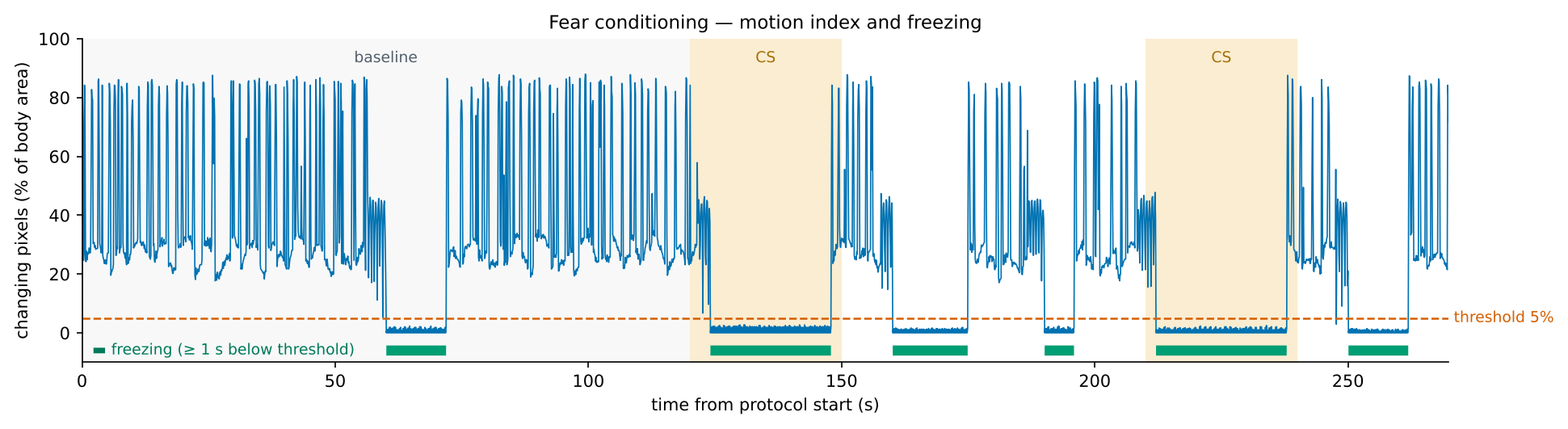
How "% of body changing" works. For every pair of consecutive frames 0.1 s apart, the app counts the arena pixels whose brightness changed by at least 20 gray levels. That count is divided by the animal's typical body area, which is the median size of the tracked body over the session. The threshold therefore means the same for a small and a large animal and for a near or far camera. In the example above, the moving mouse scores 20–90 % and the still one stays below 3 %. See Freezing.
Calibrate the threshold once per setup
Lighting, camera and bedding change the motion signal. Score freezing by hand on 3–5 videos from your own setup, compare with the app at a few thresholds (the result updates instantly), and use the threshold that agrees best for all further animals.